
Scrapbook Hints & Tips
- Packing for your Next Scrapbook Getaway!
Whether a few hours at a friend's house, a full day crop or a weekend retreat, preparing for a scrapbook session away from your regular work-space can be challenging. How much should you bring – pictures, tools, paper and other supplies? It's not usually reasonable (or feasible) to pack up your entire scrapbook room to bring along with you! The key is planning ahead!
Some basic information from your event organizer before you start packing is a good starting point to help you plan.
1) How much space will you have? The workspace available to you during a crop will not only determine if you have extra room to store your supplies on the table, it will also give you an idea of how much room you'll have under the table to tuck away your tote & other supplies when not in use. You still want things handy, but not in the way!
2) Are there any tools or supplies provided by the event organizer? Many retreat & crop organizers set up a "tool table" for participants attending their event. Items may include die-cutting machines (such as Cricut, Big Shot, Cuttlebug), punches and rubber stamps. Some will even provide a computer and printer so you can do your journalling. Find out ahead of time if these are accessible to you during an event, if there's an additional charge to use them, or if you need to provide some of your own materials to be able to use them (i.e. your own cutting mat if you're using their Cricut).
3) Will there be scrapbook supplies available for purchase at or nearby the event? There's nothing worse than running out of adhesives or other basic supplies mid-way through a crop. If you have access to an on-site store or don't have far to go to get to one, a little "retail therapy" may be just the answer to get you through the event and may even help get over some scrapper's block!
Once you've got these questions answered from the scrapbook event organizer, coordinate with your scrapping friends who are also attending the event so all of you aren't each bringing the same tools that can easily be shared. From there, it's time to determine what project(s) you want to work on and what supplies you need for those specific projects. Some key items you'll need are:
1) Basic supplies, such as adhesives, paper trimmer, journalling tools, etc.
2) Photographs & related memorabilia
3) Paper & embellishments - Pulling together coordinating papers and embellishments ahead of time and preparing your own page kits can help make for a more successful event. There's no sense hauling all your wedding or baby-themed paper and embellishments if the project you'll be working on is a scrapbook from your most recent vacation! The extra effort you make in this area ahead of time will not only help reduce what you bring, but more importantly, it can make a substantial difference in how productive you are while you're at the crop or retreat.
4) Other items - Some items aren't specific to your scrapbook projects, but might be considered "must haves" at any crop or retreat. A thermal mug for your coffee or tea, a water bottle, bandaids, your favourite scrapping snacks and some scrapbook magazines or books to help you get over scrapper's block are just a few of the additional items you may want to bring!
Most important of all, a crop is a fun and social event! Don’t fret if you have some “scrappers-block”. Take that time to browse through some magazines or to admire the creative talents of your fellow scrappers. If you see something you especially like, don’t be afraid to ask how it was done. The majority of scrappers are proud to show off their pages, and are very willing to share a trick or technique. Remember, imitation is the greatest form of flattery, and scrap-lifting is accepted and encouraged in the scrapbooking community!
- Scrapbook Room Organization
I continually struggle with organizing my work area so I have an effective place to scrapbook. Unfortunately, I don't have a dedicated scraproom - I have a space set up in our spare bedroom (and constantly hope nobody comes for an overnight visit!!). Adding to the problem of limited space is my addiction to shop for all things scrapbooking (an addition I'm sure that's shared by many others).
I've lost track of how many times I've gone through my supplies in search for something I'm sure I had, but been unable to find. Even worse, I would finish a page and afterwards find the perfect embellishment(s) that would have made a good layout a great layout! So, I decided it was time to do something to get some of my embellishments out of the drawers and cupboards and out in full view.
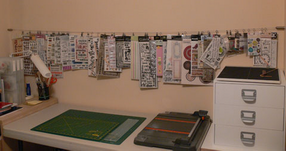
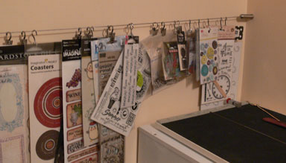
There are some great storage items in the industry to help keep your supplies organized, and if your space can accommodate them, they are worth considering. However, with limited table space, I needed something to take my supplies off the table. Unfortunately, at the time I went looking, there wasn't anything at my local scrapbook stores that would work.
What I ended up with was this handy little wire, which is actually a "curtain rod" from Ikea! It comes complete with wire, mounting posts and two different styles of clips - a loop type & a clamp type - with extra clips sold separately if you need them. Depending on your space, there are different types of mounting posts available so you can set this up to whatever configuration you need. And at less than $30 for the curtain wire and clips, it was a great investment!
This has turned out to be a great organizational and space-saving tool for me! Now, while I'm working at my little table, I only have to glance up for some ideas on what little extras I can add to my scrapbook layouts.
NOTE: I put this up a number of years ago, and since that time there some scrapbook specific products have come out on the market that accomplish what I set out to do, and in some cases much more effectively. There's no right or wrong - it's whatever works best for you!